Studio is a powerful, web-based platform designed to manage and enhance your sports video productions.
To access the application, please visit Studio
From creating graphical overlays to managing live video streams, Studio provides a centralized hub for your production needs.
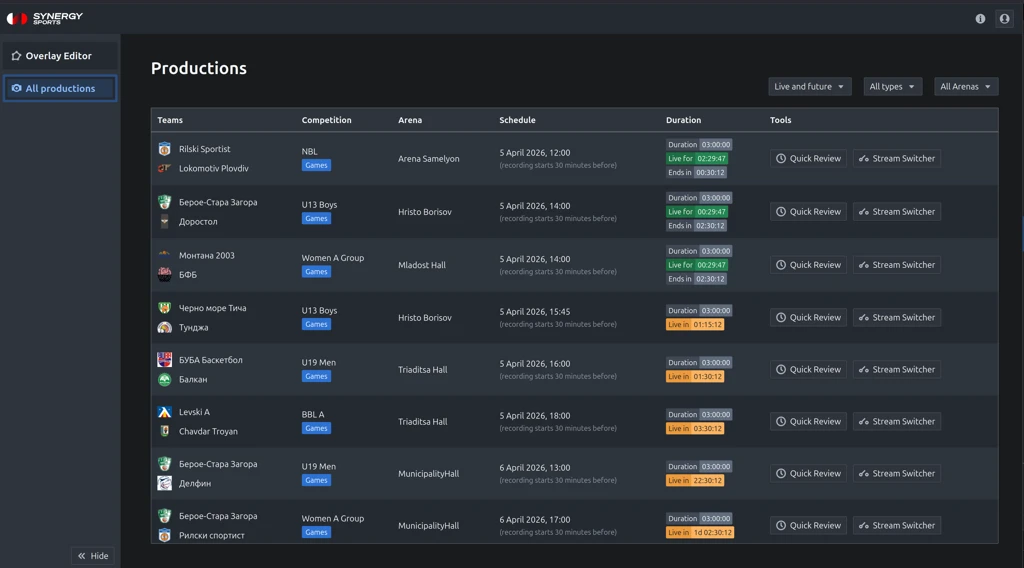
Top Bar
The top bar, located at the very top of the application, provides access to general information and user-specific settings.
- Release Notes: Located on the right side of the top bar. This provides a summary of the latest updates, new features and improvements to the Studio application without navigating away from your current view.
- User Menu: Also found on the right side, you can click on the user icon which will open the user menu.
Left-Side Navigation Menu
The main navigation for Studio is the collapsible menu on the left side. This is where you access the core modules of the application.
- Overlay Editor: This module allows you to create, manage and customize graphical overlays for your video streams.
Read more - Productions: This module provides a list of all your available productions. Selecting a production gives you access to a suite of powerful tools for managing the event, including Quick Review, Stream Switcher and the new Control Room for multi-camera stream management.
Main Content Area
This is the central part of your screen and the primary workspace. The content displayed here is dynamic and changes based on which module you have selected from the left-side menu.
- If you select Overlay Editor, this is where you will build and edit your graphics.
- If you select a production from the Productions module, this area will display the list productions and available tools for each of them.
Was this article helpful?
That’s Great!
Thank you for your feedback
Sorry! We couldn't be helpful
Thank you for your feedback
Feedback sent
We appreciate your effort and will try to fix the article