Competition Management Release Notes 1.9.4
Release Title: Competition Management Release Notes 1.9.4
Release Date: 04/15/2026
Description: Release 1.9.4 introduces expanded Import/Export functionality at the organization level, enabling bulk data operations across supported CMAN entities. This release also delivers new standardized list page table designs, a configurable table density setting, improved post-creation navigation across all major workflows, and key bug fixes for venue filtering, fixture exports, and authentication.
Note: As we continue to implement new design UI across the CMAN product, you will notice changes have been made to the Fixture List Page and Competitions List, but not others (e.g., list pages). We'll implement across all list pages in the upcoming releases.
Highlights in This Release
- Import/Export Functionality: Import/export for Competitions, Seasons, Clubs, Teams, Sites, and Venues
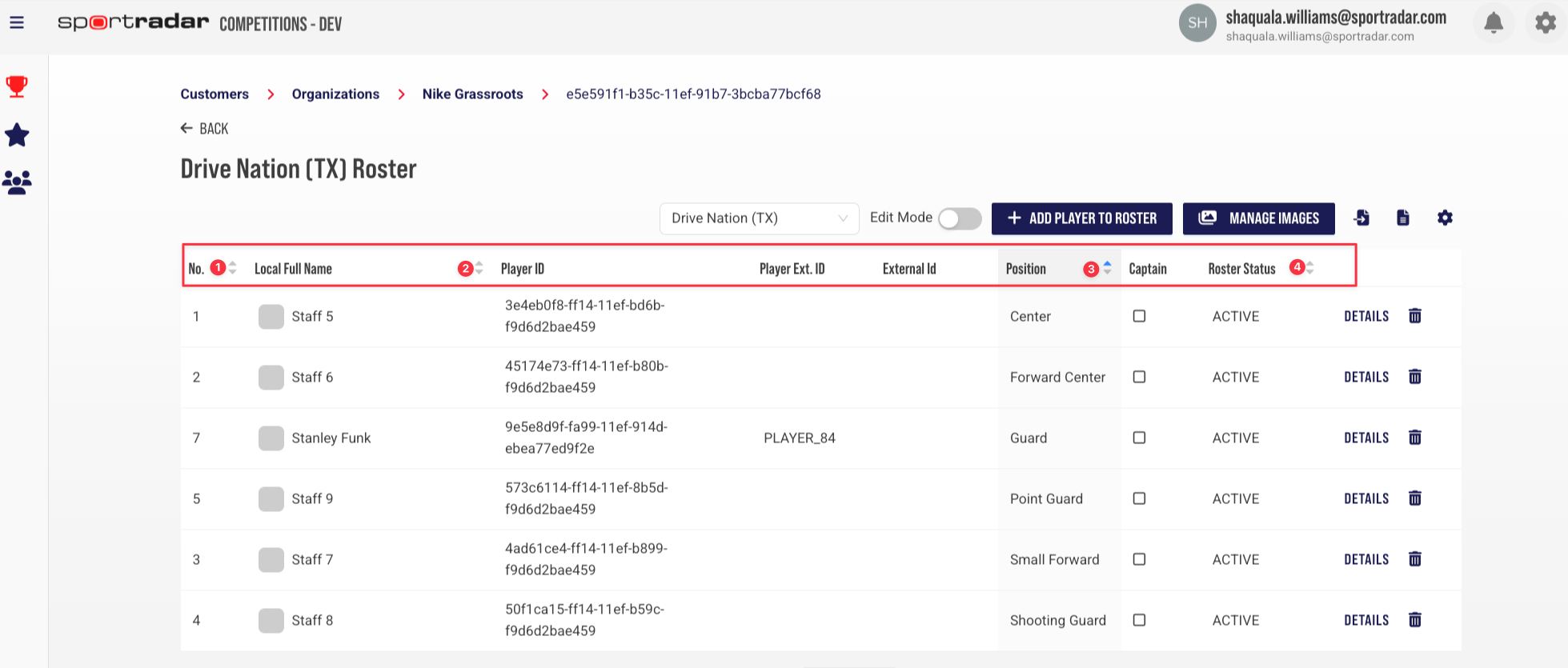
- Season Team Roster: Sort columns for Roster Number (bib), Local full Name, Position, and Roster Status
- List Page Design: Fixture List Page and Competitions page have been updated with a standardized table.
- Updated "Add New" Workflows: Adding a Qualification, or Match Profile, now returns users to the list page
- Table Density Setting: Compact, Standard, and Comfortable views to control row spacing across list pages
- Standings Points Given Field: Allows adjustment of Standings Points, directly in the CMAN UI
- Notification Preview Panel: View notifications directly from the side panel without leaving the current page
Import/Export Functionality
Expanded import and export capabilities across org-level Competition Management entities, enabling federations to efficiently manage bulk data operations.
What's Changed:
Import/Export for Competitions using CSV file
Import/Export for Teams using a CSV file
Import/Export for Venues using CSV file
Import/Export for Sites using CSV file
Import/Export for Seasons using a CSV file
Import/Export for Clubs using CSV file
List Page Table Design
Implemented new standardized list page table designs across the Competition Management entity list pages.
What's Changed:
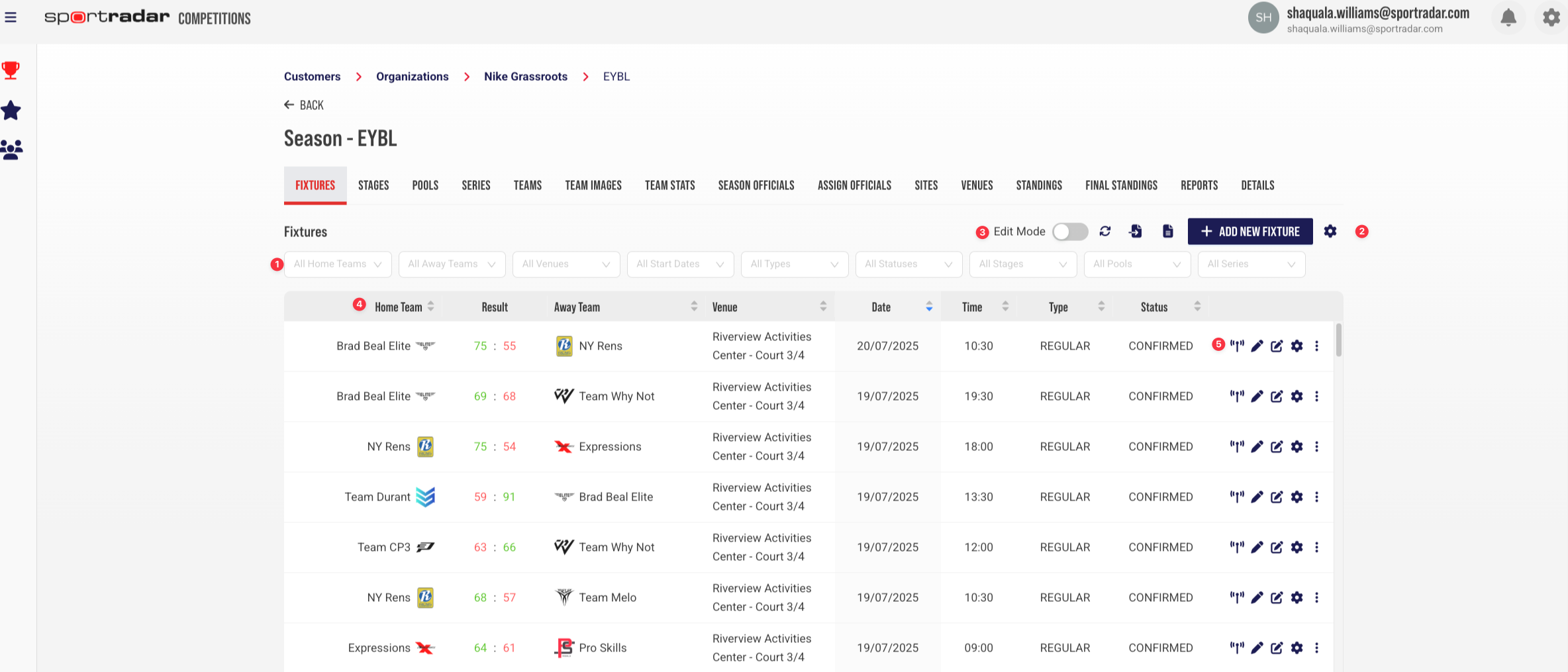
Fixture List Page (Former)
Top Level Fixture Dropdown (varies based on sport)
Fixture Table Components for Adding Fixture, Import, and Export
Fixture Data Manipulation Components (Edit Mode, Refresh, Table Column Selector)
Fixture Default Columns (varies based on sport)
Fixture Kebab Menu replaced action buttons and icons
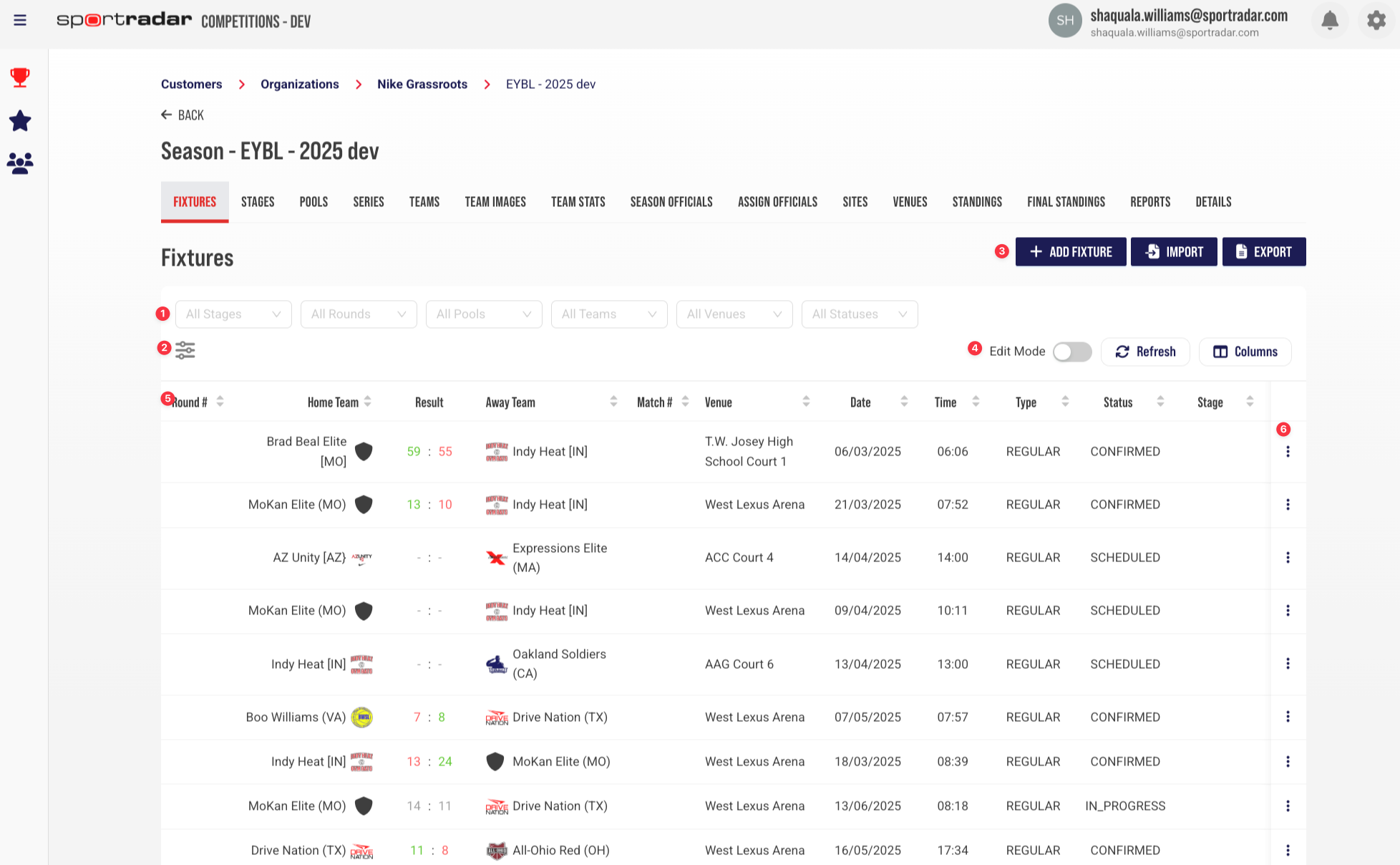
Fixtures List Page (Current)
Top Level Fixture Dropdown (varies based on sport)
Fixture Filter Panel for Data Range
Fixture Table Components for Adding Fixture, Import, and Export
Fixture Data Manipulation Components (Edit Mode, Refresh, Table Column Selector)
Fixture Default Columns (varies based on sport)
Fixture Kebab Menu replaced action buttons and icons
? Column Sorting — Season Team Roster
The Season Team Roster page columns are now sortable, giving users more flexibility when reviewing and managing roster data. Sort by any of the following columns:
What’s Changed
Roster Number (Bib)
Local Full Name
Position
Roster Status
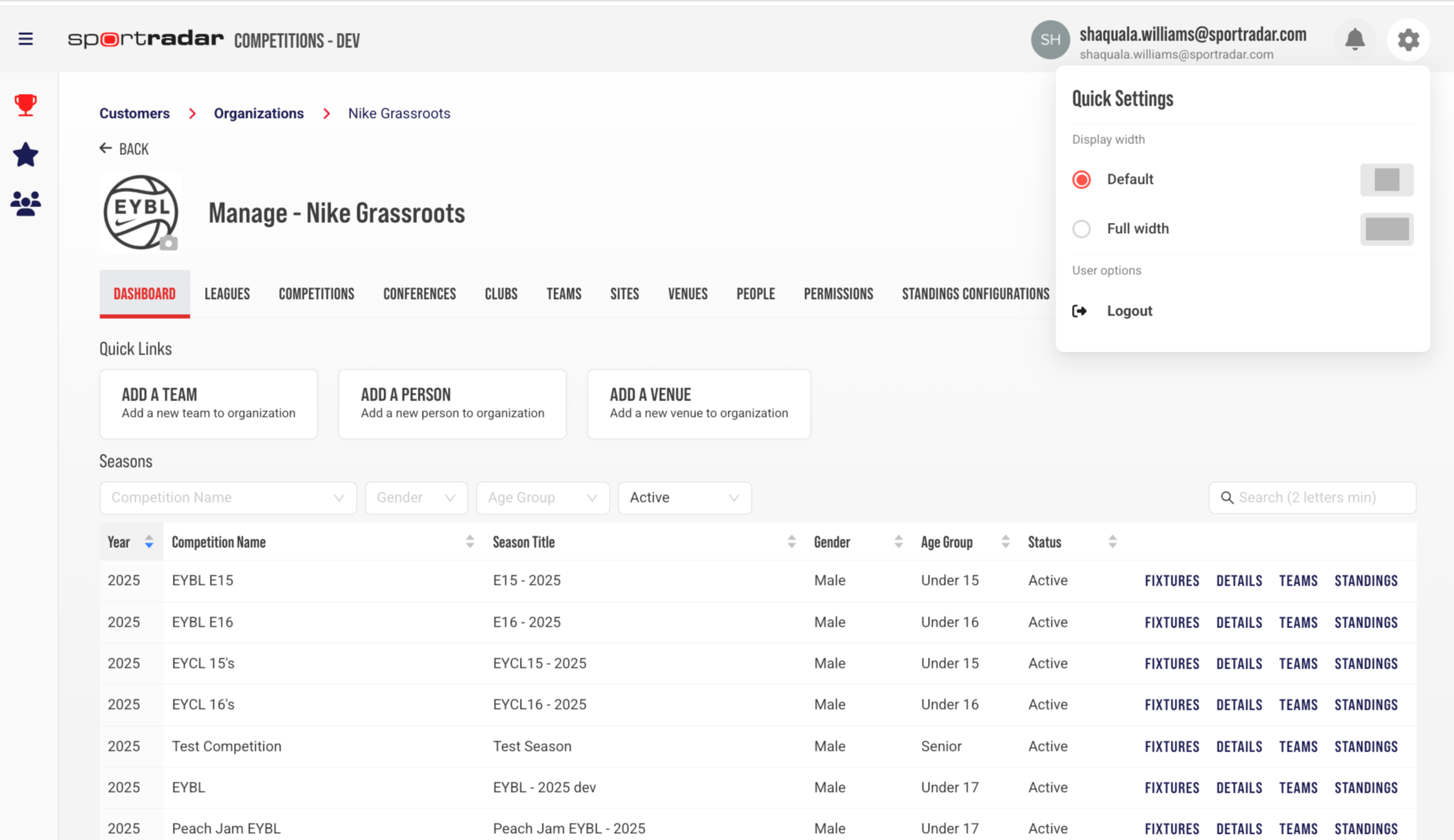
⚙️ Table Density Setting
Implemented an option that allows users to set table display density. Table density controls the vertical spacing between rows across list pages.
What's Changed:
Users can choose between three views based on their preferences and workflow needs:
Compact — more rows visible on screen
Standard — balanced spacing
Comfortable — more spacing between rows
? Updated "Add New" Workflows
After adding any record, users are now automatically returned to the relevant list page. This applies across all entity types, reducing navigation steps and speeding up bulk-creation workflows.
What's Changed:
Adding a Season, Team, or Person returns the user to the main list page
Adding a Conference returns the user to the Conferences page
Adding a Club returns the user to the Clubs page
Adding a Venue returns the user to the Venues page
Adding a Standings Configuration returns the user to the Standings Configurations page
Adding a Leader's Qualification returns the user to the Leader's Qualifications page
Adding a Match Profile returns the user to the Match Profiles page
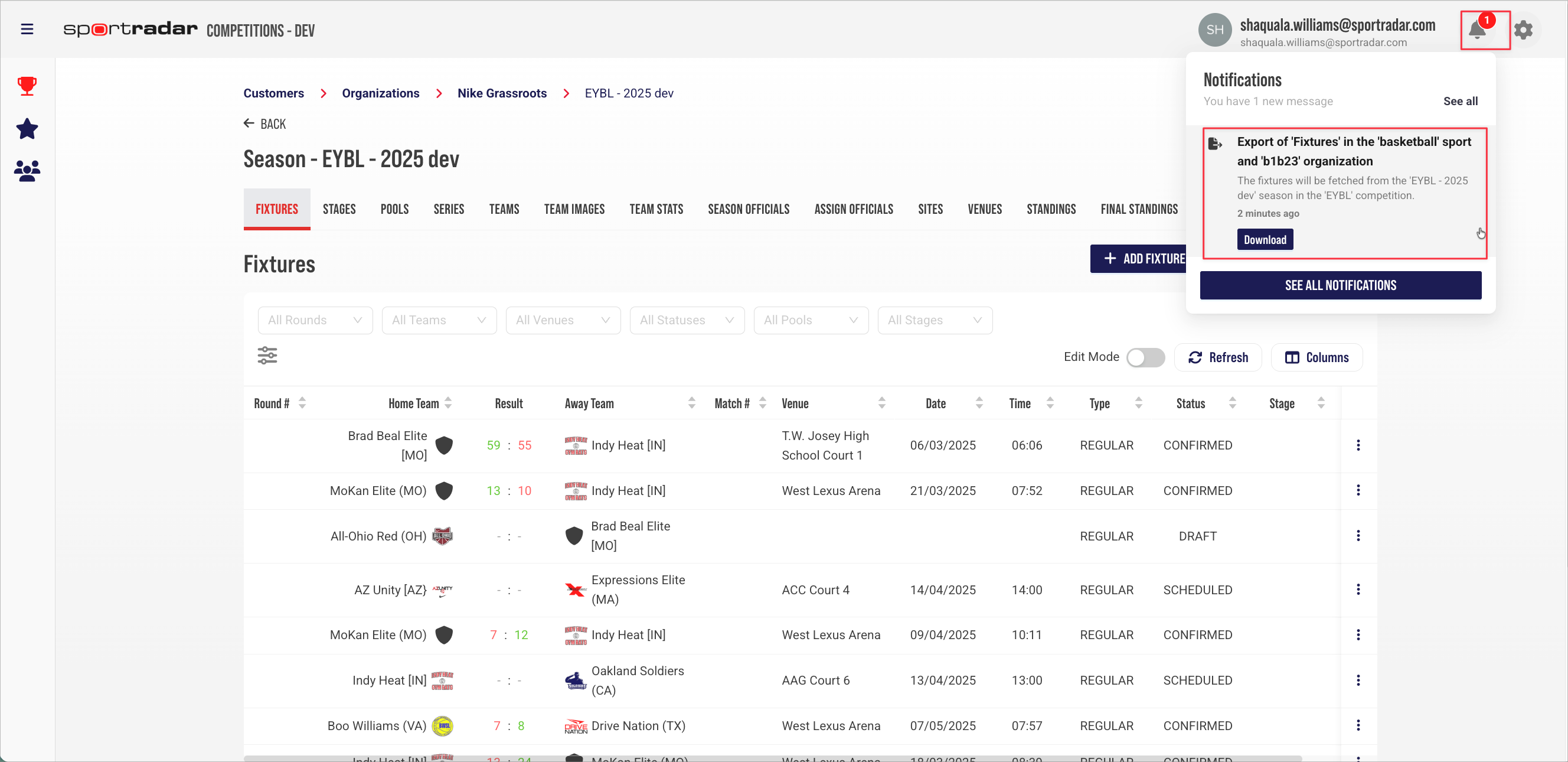
? Notification Preview Panel
Users can now preview their most recent notifications without leaving their current page. Clicking the notification bell in the global header opens a small panel displaying the four most recent notifications, ordered from newest to oldest.
What's Changed:
Notification bell opens an inline preview panel — no page navigation required
Displays up to four most recent notifications with title, preview text, and relative timestamp
"See all" link provides quick access to the full Notifications Inbox
Panel closes when clicking the bell again, clicking outside, or navigating away
An empty state is displayed when no notifications are available
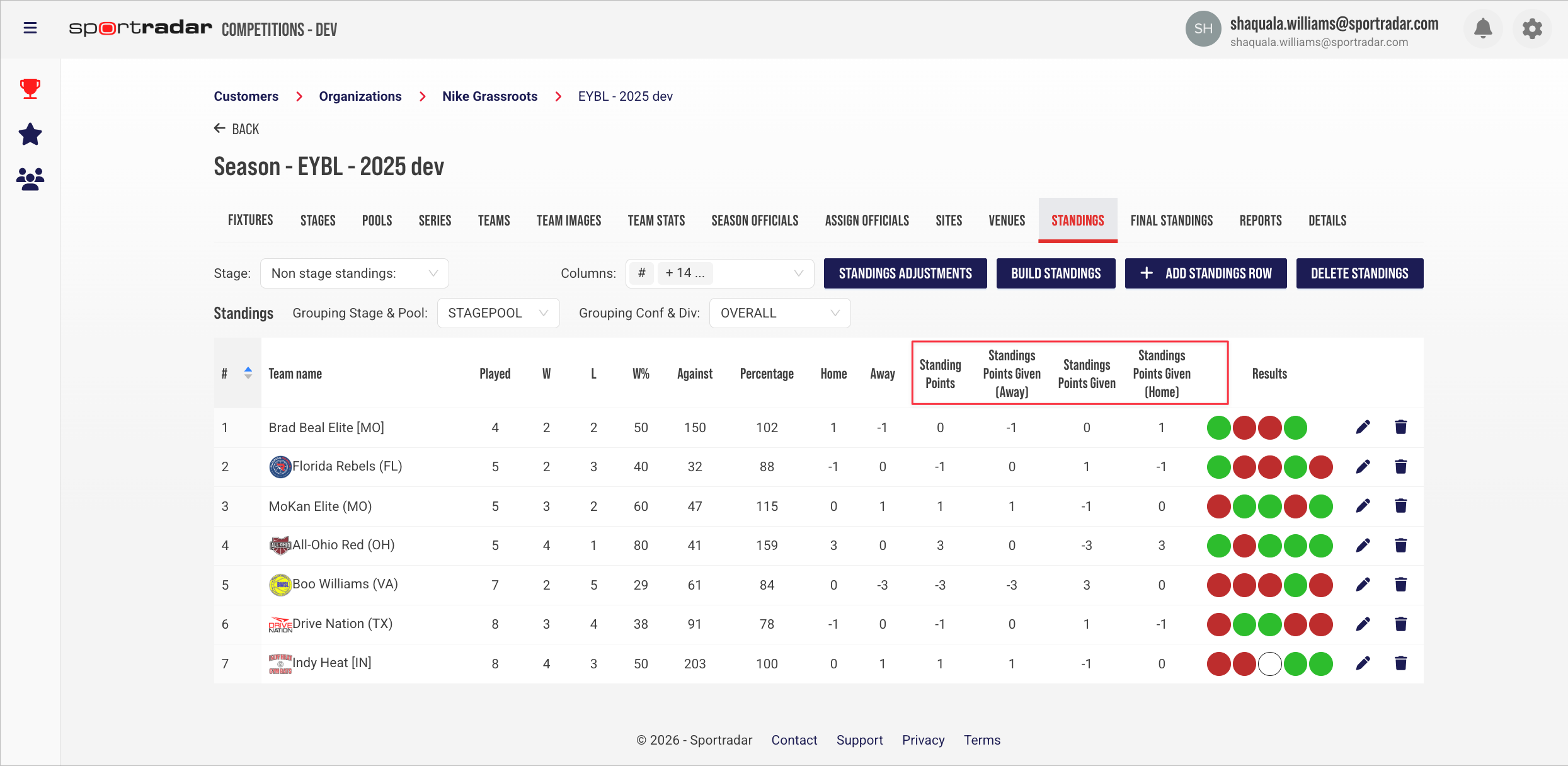
? Standings Points Given Field
Added a field in Standings Adjustments to allow modification of Standing Points Given directly from the CMAN UI.
What's Changed:
Standings Points Given
Standings Points Given (Home)
Standings Points Given (Away)
Was this article helpful?
That’s Great!
Thank you for your feedback
Sorry! We couldn't be helpful
Thank you for your feedback
Feedback sent
We appreciate your effort and will try to fix the article