- No labels
- Edit Labels
Release Title: Competition Management Release Notes 1.9.3
Release Date: Wednesday, February 5, 2025
Description: Competition Management is being modernized in phases to enhance consistency, reliability, and scalability. Release 1.9.3 introduces the first visible updates, including foundational front-end refactoring, standardized UI components, and more predictable workflows. Additional improvements are planne
Highlights in this Release
Organization Dashboard: Refactored for faster search and persistent filters.
Person Management: Enhanced with a unified Add Person modal and streamlined workflow.
Predictable Workflows: Standardized creation workflows for seasons, teams, and persons
Global Fonts: Standardized typography and visual hierarchy across the platform.
Navigation Menu: Standardized navigation components for organization and season views.
Image Uploader: Unified across the platform for reliable image management.
Asynchronous Reports: Season reports for Basketball and Field Hockey are now generated asynchronousl
Organization Dashboard
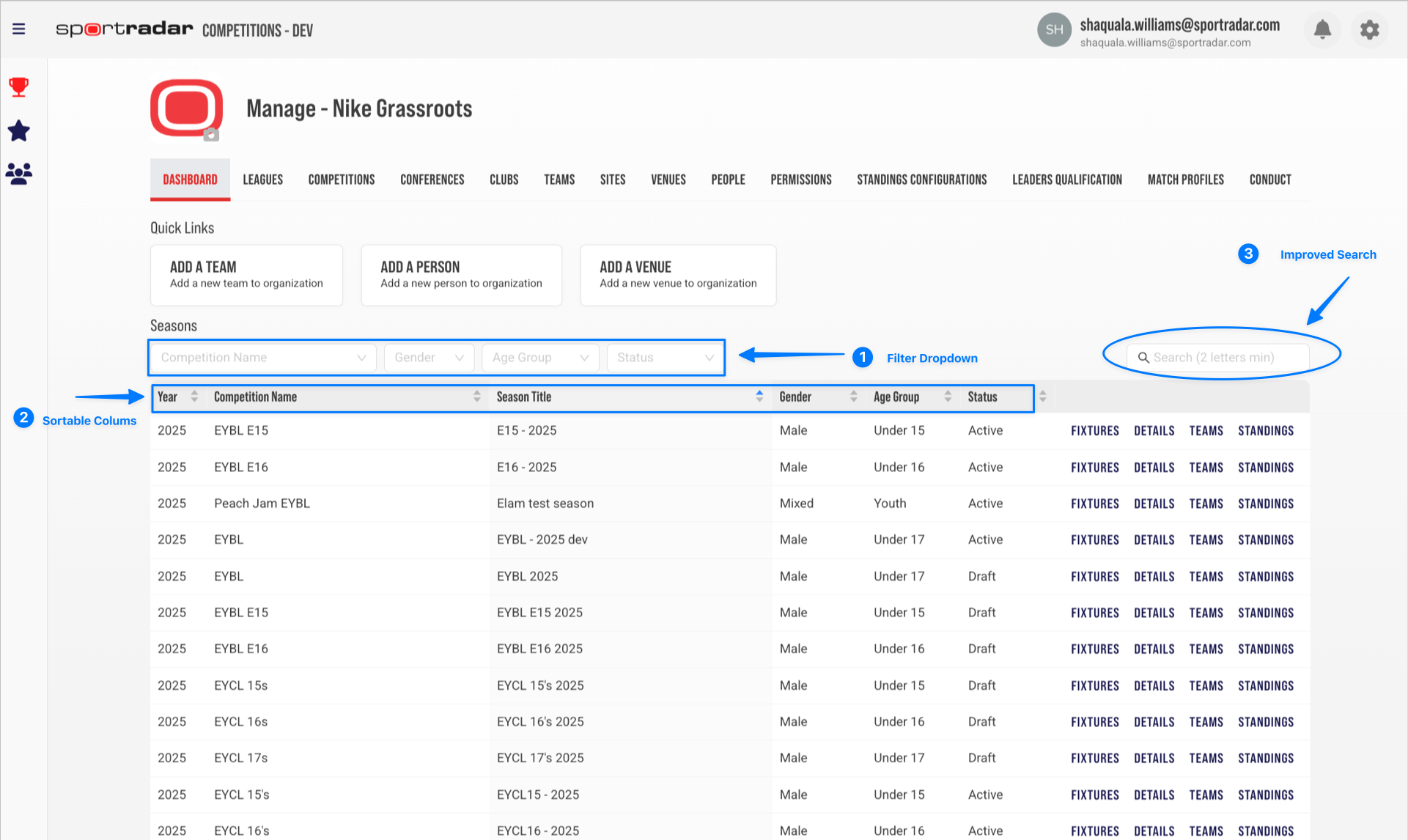
The Organization Dashboard has been refactored with a modernized front-end. Legacy UI components have been replaced with standardized ones. New filter dropdowns for Competition, Gender, Age Group, and Status have been added. The dashboard table now uses a default sort order, and search behavior is consistent with other Competition Management list pages. User-applied filters, sorting, and search selections are saved and automatically restored, improving user control and efficiency.
What's Changed:
- New filter dropdowns added: Competition Name, Gender, Age Group, Status.
- Default Sortable Columns: Year, Competition Name, Season Title, Gender, Age Group, and Status
- Enhanced search with 2-character minimum
- Filters and sortable column headers with persistent preferences
Why it matters: Enables faster discovery of competitions and seasons with consistent dashboard behavior.
Organization Dashboard
Organization Dashboard with (1) New Dropdown Filters, (2) Default Sortable Columns, (3) Enhanced Search, and (4) Persistent Filters and Sorting.
Person Management
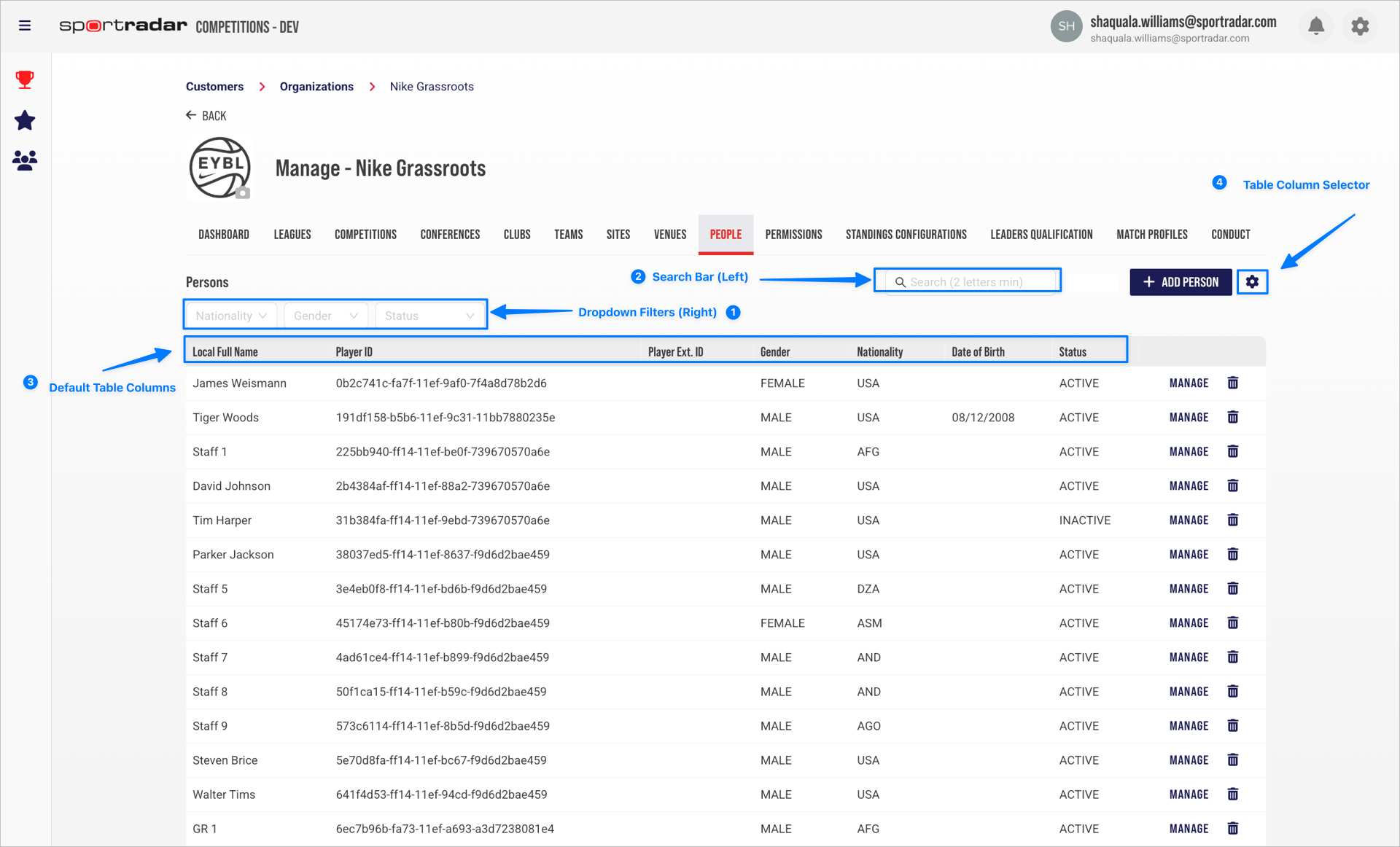
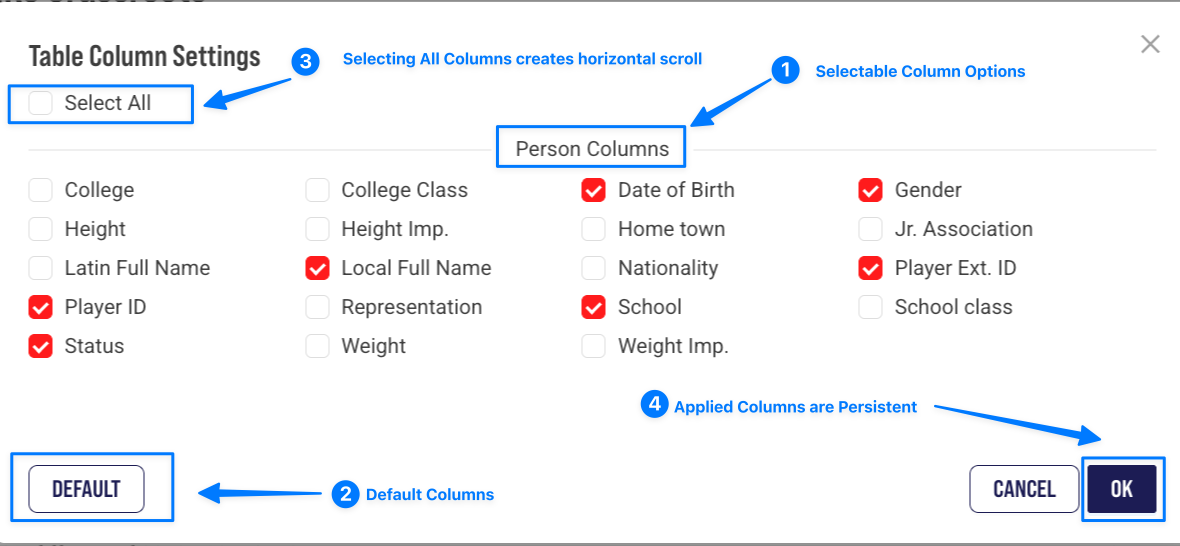
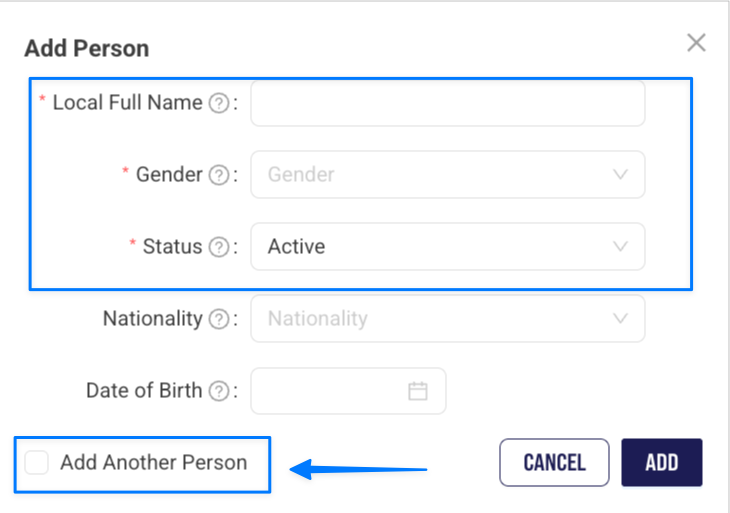
The Person List page has been refactored, replacing legacy components with standardized tables, search, filters, and actions. A single Add Person modal is now used for persons, season officials, and team staff. A Table Column Selector has also been introduced.
What's Changed:
- Standardized list page layout aligned with other CMAN list pages
- Improved search and filtering behavior
- New unified Add Person modal for persons, officials, and team staff.
- Reduced the number of steps when creating multiple people
- Customizable table views with persistent column selection
Why it matters: Enables more efficient setup and management of officials and staff, flexible viewing of person data, and consistent workflows across competitions and seasons.
Person List Page
Person List Page (1) Filters, (2) Search bar, (3) Default Columns, and (4) Table column selector control.
Person Table Column Selector
Table Settings: (1) Person Column Fields, (2) Display Default Columns, (3) Display All Columns with horizontal scroll, (4) Persistent Columns
Person Add New Modal
Add Person Modal: (1) Required Fields, (2) Add Another Person, (3) Single modal for Persons, Season Officials, and Season Team Staff.
Navigation Menu
Navigation Menu: Organization and season-level navigation have been refactored, replacing legacy UI components with standardized ones. Navigation behavior and state handling have been improved, ensuring smoother and more predictable navigation.
What's Changed
- Standardized navigation components across organization and season views
- Improved routing and context handling
- Global layout elements shared across both navigation levels (e.g. Header, Breadcrumb, Language selector)
- Improved responsiveness and accessibility (keyboard nav, tab focus, ARIA roles)
Why this matters: Provides clearer navigation across complex competition structures and more predictable behavior when moving between organization and season contexts.
Typography & Visual Hierarchy
Global typography has been refactored at the front-end codebase level. Fonts have been replaced with standardized typography across global shell components and organization and season-level list pages.
What's Changed:
- Consistent visual hierarchy across headings, tables, and actions
- Bebas Neue Pro for all headers
- Roboto for body text, tables, and interactive elements
- Clear, consistent visual hierarchy
Why it matters: Improves readability of competition and season data and provides a more uniform experience across Competition Management.
Image Management
The Image Uploader has been refactored and replaced with a unified version, resulting in more reliable and predictable image management. This update ensures consistent image handling across entities and improves user confidence. An issue causing container overflow on the Person Profile page has been resolved. No visual changes are required.
What's Changed:
- Consistent image upload behavior across all supported entities
- Improved upload performance and reliability
- Image upload behavior across supported entities
Why this matters: Provides more dependable image management for organizations, competitions, teams, and seasons.
Season Reports (Basketball & Field Hockey)
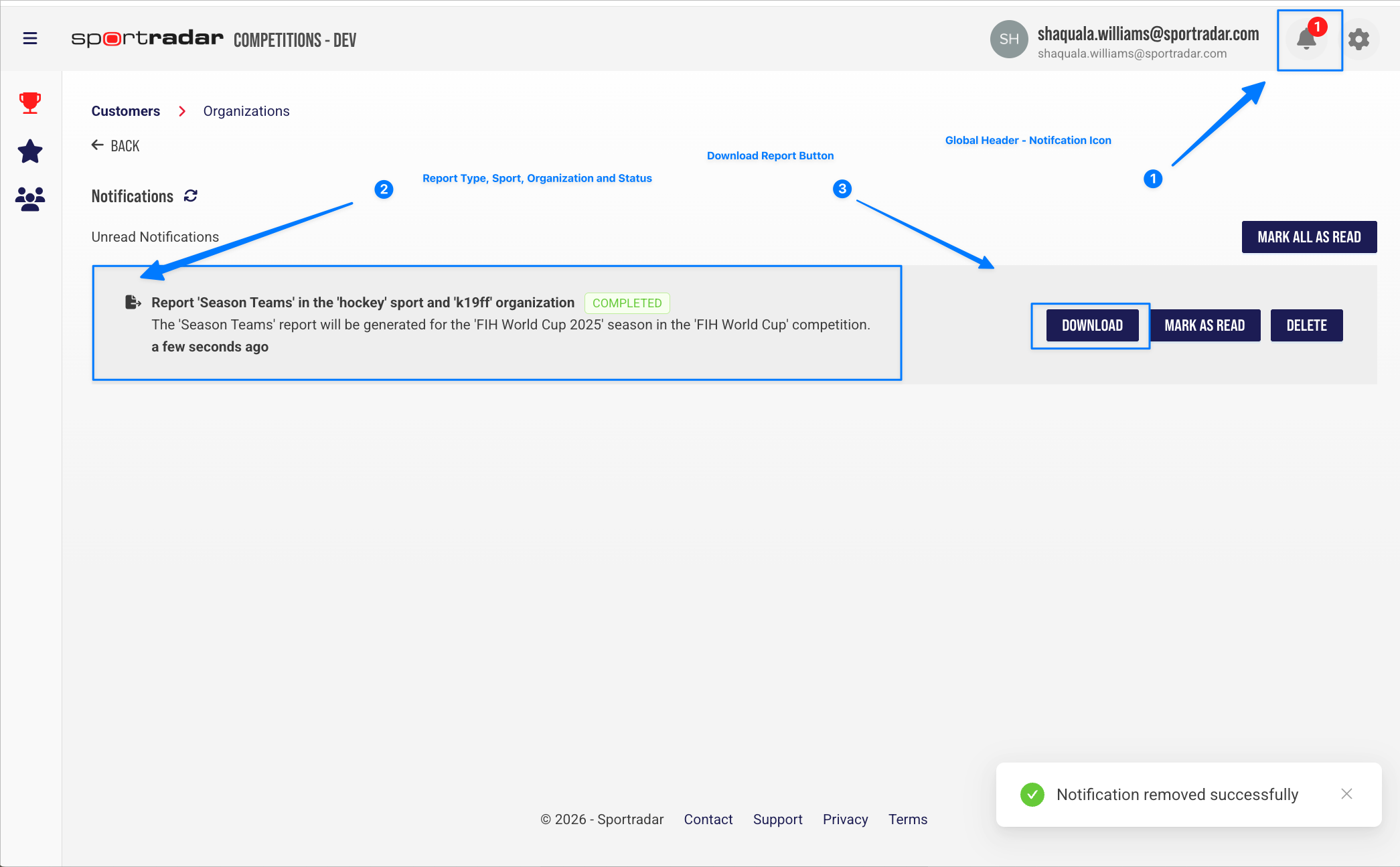
Season reports are now generated asynchronously. When a report is ready, users receive a notification and can download the PDF from the Notifications page. This process provides clear feedback and keeps users informed during report creation.
What's Changed:
- Report delivery aligned with existing import/export workflows
- Notification when a report is ready
- PDF downloads available from the Notifications page
- Delivery aligned with multisport workflows
Why it matters: Provides clear feedback on report status, reliable access to season reports during active competitions, and consistent notification workflows for system-generated reports and operations.
Generating Reports Workflow
- Select Organization (Field Hockey or Basketball)
- Navigate to a Season
- Open Reports Tab
- Select Report Type
- Click Report Type to Generate
- Check Notification Bell
- View Notification Panel
- Click the Download Button
- Open PDF Report

Was this article helpful?
That’s Great!
Thank you for your feedback
Sorry! We couldn't be helpful
Thank you for your feedback
Feedback sent
We appreciate your effort and will try to fix the article